
Court Calendar for Wichita’s Sedgwick County lets residents pinpoint court schedule, upcoming court dates, and specific court hearings without endless phone calls. By entering a case number or party name, the online hearing schedule pulls the exact courtroom location, hearing time, and presiding judge from the judicial calendar. This instant court docket calendar reduces uncertainty and helps attorneys, defendants, and the public plan travel or virtual attendance efficiently.
To locate a specific hearing, use the court calendar search by judge or by date, then click the hearing calendar entry to see status codes such as rescheduled or canceled. The portal also supports a court date lookup by case number, showing whether a hearing was postponed, changed courtroom, or sealed for confidentiality. For remote participants, a virtual hearing link appears beside the hearing type, making online attendance straightforward.
How to Search Court Calendar
The Sedgwick County District Court calendar is the public starting point for checking a court appearance scheduled in Wichita. A calendar search can locate the hearing date, time, courtroom, hearing type, judge, and hearing status for a listed case. Residents can also consult sedgwick county ks for comprehensive local county services. Use a case number for the most direct match; when that number is unavailable, use a listed party name with a date or judge filter. Schedules can change after a hearing is set, moved, continued, or canceled, so check the newest entry before you travel or join a remote hearing.
Official Search Portal: https://www.dc18.org/records
Steps to Search
- Open the portal and choose the court calendar or case-record search option shown for court dates.
- Enter the case number exactly as it appears on court papers or an earlier notice. A case number gives the most direct route to the matching docket entry.
- If you do not have the case number, enter the full legal name of a party. Use the form’s separate name fields when they appear.
- Add a date, judge, division, or case-type filter when the form offers one. Search by date for a daily schedule or by judge for that judge’s listed appearances.
- Open each matching entry and compare the hearing date, time, courtroom, judge, type, and status. If nothing appears, retry with an exact spelling and one filter at a time, then verify with the court office listed at the end of this page.
Court Schedule Details
A court calendar result is a dated appearance record tied to a case. Its fields answer four practical needs: which case is involved, when the listed event occurs, where the hearing takes place, and whether it still stands. Read those fields as one set rather than relying on a date alone.
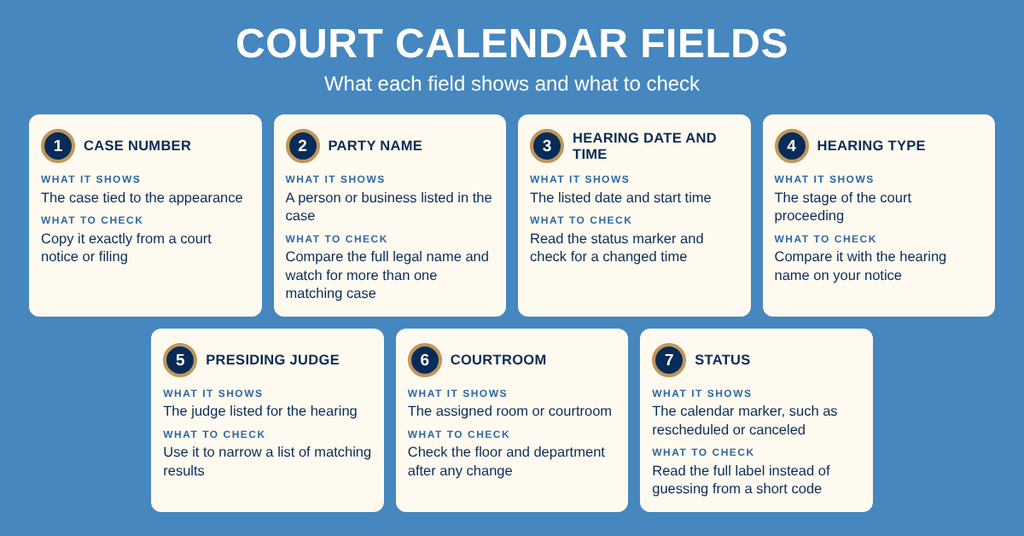
Hearing Time and Courtroom Location
The date and time answer when the hearing occurs; the courtroom answers where to go. A location can depend on the court department, floor, and assigned room, so a hearing date by itself does not confirm the full destination. Use the newest calendar entry to plan travel. Do not rely on an older printed notice after the calendar shows a room change. A blank room or unclear location is a reason to contact the court office before travel.
Case Number and Listed Parties
A case number is the best field for a court date lookup because it points to one case rather than a list of cases with similar names. Copy every character shown on the filing or notice. A party-name search can return multiple matters, so pair the name with the hearing date, case type, or judge when those fields are available. If the name is missing, try the exact spelling used on the court record rather than a shortened version.
Hearing Type and Presiding Judge
The hearing type tells you the kind of court event listed. A motion, arraignment, trial, or sentencing entry serves a different purpose and may carry different preparation needs. The presiding judge field can narrow a search that returns many matching parties. Read the judge and type together, since a judge can hear matters in more than one department. Your hearing notice or order remains the source for what you must bring or do.
Calendar Status Codes
Calendar status markers may appear as short codes or full phrases. Read the wording beside the code and open the linked case entry for the listed event. A reset, continuance, cancellation, or room change can affect which date appears as the current setting. Read the code with the full date, time, courtroom, judge, and hearing type. If a code has no plain-language label, ask the court office to interpret it instead of guessing from the letters.
Daily, Weekly, and Judge Views
Set the calendar date before reading a daily schedule. For tomorrow’s date, move the date selector forward one day rather than assuming today’s entries will stay unchanged. A weekly view needs a date range or each court date in that week; use a week control if the portal offers one. A monthly view has the same limit: check each date unless a calendar grid or range control is available. For a judge schedule, select the judge’s name, set the date, and compare the entries under that judge. Time values follow the court’s local schedule, so note the date next to every time.
Court Calendar by Judge
A court calendar by judge answers a practical question: which hearings are listed for that judge on a chosen date? It can help attorneys, parties, and public observers compare a hearing with a judge’s daily or weekly docket. Use the judge’s full name shown by the court and set the date at the same time. A judge name alone can return hearings from different departments or case types.
Daily and Weekly Judge Views
To find today’s court schedule for a judge, choose the current date and the judge’s name. For tomorrow’s schedule, change the date before reading the results. To check a week, use a date-range or week control if shown; if the portal presents one day at a time, repeat the search for each court date you need. Each result still needs a case-level check because the judge’s list can contain many matters with different locations or hearing types.
Confirming Judge and Calendar Results
Judges can be assigned to different divisions, and a hearing can move to a different judge after a case reset. Search results may show the same case under a new presiding judge. Compare the judge on the newest entry with the judge named in the notice or order. If those sources disagree, ask the court office which calendar entry is current.
Types of Court Hearings
The type label on a calendar entry groups a case by subject and stage. It helps you distinguish a first appearance from a later hearing, or a civil filing from a criminal charge. The label gives context, but it does not replace the written notice, court order, or hearing instructions.
Civil, Criminal, Family, Probate, and Juvenile Dockets
A civil docket usually concerns a dispute between parties over money, property, contracts, or another claim. A criminal docket concerns a charge brought by the state. Family dockets cover matters such as divorce, parental rights, or support. Individuals can also check probate court online records to verify relevant details. Probate dockets concern estates and related court requests. Juvenile dockets involve minors and may carry privacy limits, so a public calendar may show less case detail.
Arraignments, Initial Appearances, and Pretrial Hearings
An initial appearance is often the first listed event for a criminal case. An arraignment is the hearing at which the defendant enters a formal response to the charge. A pretrial hearing addresses case status or trial preparation before trial. Read the complete label: a calendar may place a motion, plea, or case-management setting inside one of these broader categories.
Motions, Status Hearings, and Case Management
A motion hearing lets the judge consider a request to grant, deny, or change part of a case. A status hearing checks the next stage and may address what remains unfinished. A case management hearing gives the court a chance to review preparation and deadlines. These labels can change based on the order setting the hearing, so the hearing notice gives the more exact purpose.
Trials and Sentencing Hearings
A trial hearing is set for the stage where evidence is presented and the case is decided. A sentencing hearing is set after a conviction when the court will set a sentence. The calendar may not say whether a trial will be held before a jury, so do not infer that fact from the hearing label. Confirm trial type, witness needs, and any filing deadline with the case notice or court office.
Traffic, Misdemeanor, and Felony Labels
A traffic label identifies a traffic-related matter. Misdemeanor and felony identify criminal charge categories defined by state law. A search result can include more than one case type. Read the court name, case number, and full hearing title before treating a result as your case. This prevents a similar name or same-day hearing from being mistaken for the correct entry.
Schedule Changes, Hearing Locations, and Remote Hearings
A court schedule can change after the first calendar entry appears. The change may affect the date, start time, courtroom, judge, or the form of appearance. Check the status on the day you plan to attend and open the newest linked entry. The calendar records court scheduling changes, yet a party should keep any written notice it receives because the two records may not update at the same speed.
Rescheduled and Continued Hearings
A date change can force a new travel or remote-attendance plan. Open the entry that carries the newest status rather than assuming the original date stays on the calendar. A continuation can create a future setting while leaving the old date as part of the case history. A last-minute reset can also change the courtroom, so compare the whole entry instead of checking only the date.
In-Person Hearing Locations
For an in-person hearing, use the courthouse and courtroom on the latest calendar entry. Confirm the department, floor, and room after any change. Plan enough time for courthouse entry, security, and finding the correct floor. Follow posted directions and staff instructions at the building. Some proceedings are not open to the public, so the presence of a public calendar entry does not guarantee public viewing.
Virtual Hearing Links
Some calendar entries may provide a virtual hearing link. If one appears, use the link from the newest entry for that case, test the device and connection before the start time, and follow any sign-in instructions. A remote link does not by itself prove that the hearing is open to the public; court orders can limit who may join. If the case calls for a remote appearance but no link appears, contact the court office rather than assuming the hearing is in person.
Missing Court Dates and Calendar Updates
A missing court date can result from a recent scheduling action, an incomplete search, a private record, or a delay between a change and its calendar posting. An empty search result does not prove that no hearing exists. Work through the case identifiers and filters, then verify a disputed or absent date with the court office.
Calendar Update Timing
Court staff may need time to process a new setting, a reset, a continuance, or an order that changes a room. During that period, a newly scheduled or moved hearing can be absent from one view. Recheck the search and open the full case record if the portal offers it. For a hearing set for the current day, confirm the entry and its status before making the trip.
Confidential, Sealed, or Limited Entries
Some case and hearing details may stay off a public calendar because of a sealing order, a confidentiality rule, juvenile status, or another limit placed on the record. A missing public entry can still correspond to a hearing known to the parties, attorneys, and court. A public searcher cannot use the calendar to see restricted details. If your papers show a date but the public calendar does not, provide the court office with the case number and date for verification.
Missing Entry Checks
- Confirm the case number from the latest notice, filing, or other court paper. Copy it without dropping a prefix or suffix.
- Try a party-name search when the number is unknown. Use the full legal name and clear unrelated filters one at a time.
- Search by the known hearing date, judge, or case type. These fields can reveal an entry that a broader name search missed.
- Check every matching result for a second case with a similar party name. Compare the full case number before opening the hearing details.
- Contact the court office with the case number, party name, and expected date. Ask the staff member to check the case record for the latest setting.
Recently Scheduled and Historical Hearings
A hearing that was set only recently can take time to appear after the clerk posts it. A past hearing may show the original date, a changed date, or a later continued date in the same case history. Use the newest completed entry when reviewing what happened, but keep your own notice for what you received. An online calendar record cannot prove when a party saw a change, so written confirmation remains useful.
Contact Information
Use the court office listed below to check a missing date, confirm a changed hearing, or ask which calendar entry is current. Have the case number and party name ready before calling.
Frequently Asked Questions
Below are quick answers for locating and using the Sedgwick County Court Calendar.
How can I search the Sedgwick court calendar?
Visit the official records portal at dc18.org/records. Choose the Court Calendar search option. Enter a case number for the fastest match, or use a party name, judge name, or date range if the number is unknown. Click Search to view hearing date, time, courtroom, type, and status. Results update automatically when the court changes a hearing, so check back if you plan to attend.
What info appears when I look up a case number?
When you enter a case number, the system shows the scheduled hearing date, start time, courtroom number, hearing type (such as arraignment or trial), assigned judge, and current status (scheduled, continued, or canceled). It may also list the parties involved and any upcoming motions. This snapshot helps you confirm the exact details needed for preparation or attendance.
How do I find today’s court schedule by judge?
On the Court Calendar page, select the filter for Judge and choose the desired judge from the dropdown list. Set the date filter to “Today” and submit the query. The results list each hearing the judge handles that day, including time, courtroom, and hearing type. This view updates throughout the day if any changes occur.
Where can I see if a hearing has been rescheduled?
Check the Court Calendar search results for the case or judge you are monitoring. The hearing status column will show “Rescheduled” if a date change occurred. You can also look for a note indicating the new date and time. For the most current information, refresh the page or call the clerk’s office at 316‑660‑5900 during business hours.
How can I join a virtual court hearing in Wichita?
The Sedgwick County website provides a link to the online hearing platform for each scheduled virtual session. After locating the hearing in the Court Calendar, click the “Virtual Hearing” button next to the entry. You will receive a secure URL and instructions for joining via a web browser. Test your connection ahead of time and have your case number ready for verification.